HOWTO: Installing Zetafax 2007 Outlook Forms and Extensions if using Microsoft Exchange 5.5
Print
ZTN1585
ID: ZTN1585
This Zetafax technical note applies to:
- Zetafax version 2007
- Microsoft Exchange Server 5.5
Summary
Users wishing to send faxes from their Microsoft Outlook client software have the ability to use similar features to those available within in the Zetafax client. The 'Compose Fax' form and integrated viewer allow the sending and viewing of faxes directly from within Outlook. For Exchange 5.5 only, the Zetafax Outbox folder also allows one to monitor the status of faxes submitted to the Zetafax server.
Downloads:
Exchange 5.5 Connector
The connector is installed on the Exchange server and is responsible for passing messages to and from the Zetafax server to Outlook. This needs to be installed on the Exchange server first.
Zetafax Outlook Forms for Exchange
The forms are operating system specific and enable you to view received faxes. If you are in a mixed environment, please ensure you save each download to a separate location.
Zetafax Outlook Extensions
The extensions are operating system specific and help you address faxes from Outlook. If you are in a mixed environment, please ensure you save each download to a separate location.
Firstly, install the Exchange 5.5 Connector on the Exchange server.
Then, to provide these functions within Outlook for Exchange 5.5, the following three steps need to be performed.
- Create an Organizational Forms folder for Microsoft Exchange 5.5
- Install the Zetafax forms.
- Install the Zetafax Outlook extensions for each user
Creating an Organizational Forms Folder
- Open the Microsoft Exchange Administrator Program (ADMIN.EXE).
- Select 'Forms Administrator' from the 'Tools' menu.
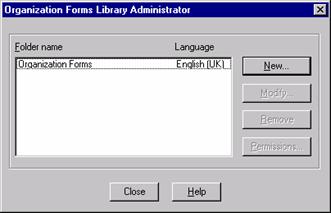
- From the 'Organizational Forms Library Administrator' window click the 'New' button to create a new forms folder called 'Organizational Forms'. If this folder already exists, skip this step.
- With the 'Organizational Forms' selected, click the 'Permissions' button.
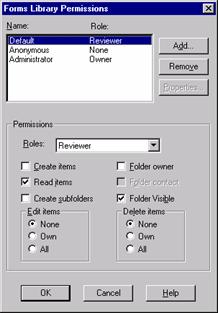
- Once inside the 'Forms Library Permissions' window ensure that the name of the Exchange mailbox (Outlook profile) being used to install the forms has a role of 'Owner'. To do this, click 'Add' and select the name of the Exchange mailbox from the user list, and then choose 'Owner' role from the drop down list of pre-configured roles.
Note: If the mailbox being used to install the Zetafax forms does not possess 'Owner' permissions, the forms will not install into the 'Organizational Forms' folder.
Installing the Outlook Forms
During the installation of the Zetafax connector on the Exchange server, a directory called Zetafax Outlook Extensions is created in \Program Files. It will be necessary for the person installing the Zetafax forms on the Exchange site to have access to this directory and to be logged into Outlook using the Outlook profile previously assigned 'Owner' permission of the 'Organizational Forms' folder. If the forms are not being installed from the Outlook client on the Exchange server, the \Program Files\Zetafax Outlook Extensions directory will have to be shared so that it is accessible from another computer on the network. Once access to the \Program Files\Zetafax Outlook Extensions directory has be confirmed, the following steps will need to be performed to install the 'Zetafax personal folder'.
You may skip the next 2 steps if you chose to add the 'Zetafax personal folder' to the Outlook client on the Exchange server during the connector installation.
- From within Outlook choose 'Open' from the 'File' menu and select 'Personal Folders File (.pst)'.
- From the 'Open Personal Folders' window Browse to the ZETAFAX.PST file and select 'OK'.
Now that the Zetafax personal folder has been added to Outlook, the forms and extensions may be installed:
- Open the 'Zetafax personal folders' and select the 'Forms' subfolder.
- Double click the 'Install the forms' message making sure that it is maximized.
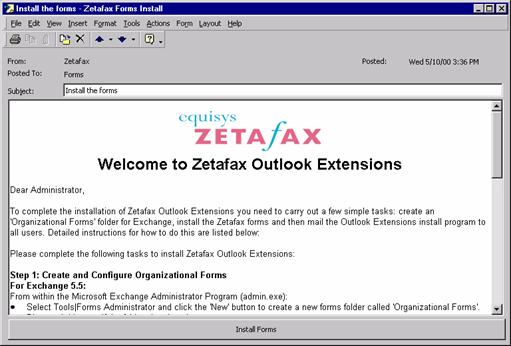
- Click on the 'Install Forms' button found at the bottom of the message.
- The Zetafax forms will now be installed in the Organizational Forms folder created earlier.
Note: If the install fails, please verify that the user is logged into Outlook using the mail profile previously given 'Owner' permissions to the 'Organizational Forms' folder and try again.
Installing the Zetafax Outlook Extensions
The final step of the installation process is to install the Zetafax Outlook Extensions on each client PC that wishes to send faxes from Microsoft Outlook. At this point the network administrator has two options for installing the extensions on each machine:
- Option 1: E-mail the Outlook Extensions to each user so that they can install the extensions themselves.
Note: If the user is running Windows NT 4.0 Workstation or Windows 2000 Professional, they will need local administration rights to install the extensions.
- Option 2: Visit each user's PC and install the Outlook Extensions.
The Zetafax Outlook Extensions are provided in a single self-extracting executable file called ZFOUTEXT.EXE. This file can be found in either the 'Welcome to Zetafax Outlook Extensions' message within the 'Forms' subfolder of the 'Zetafax personal folders' or in the \Program Files\Zetafax Outlook Extensions\ZFOUTEXT.EXE on the Microsoft Exchange server. To install the Zetafax Outlook Extensions follow either option below:
Option 1
- Select the message titled 'Welcome to Zetafax Outlook Extensions'.
- Forward the e-mail message to each user who is enabled to use the e-mail gateway.
- Have each user follow the instructions contained within the e-mail message.
Option 2
- Log on to the users PC as the Administrator if the users account does not have local administration rights.
- Close Outlook by using the 'Exit and Log Off' option from the 'File' menu.
Note: The extensions will not install correctly if the Outlook client is running.
- Double-click ZFOUTEXT.EXE from the share on the Exchange server to run the setup program.
- Follow the on screen instructions to complete the installation. The next time Outlook is opened the Zetafax extensions will be installed.
Checking the installation
The following points will help to verify the installation on the Zetafax extensions on the Outlook client.
- The 'Zetafax toolbar' will be available from within the Microsoft Outlook 2000 main window.
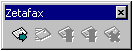
Note: The Zetafax toolbar is not supported on previous versions of Microsoft Outlook.
- Clicking the 'New Fax' button on the toolbar will launch the 'Compose Fax' form.
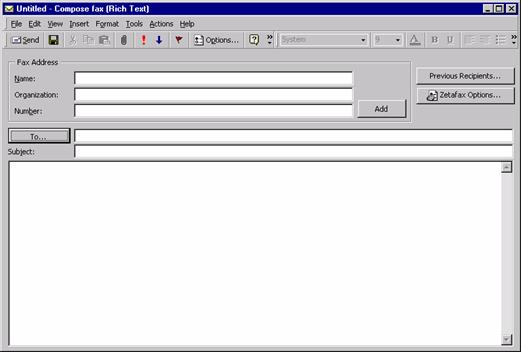
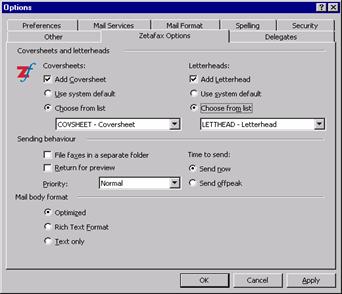
- You may access the 'Zetafax options' tab from 'Options' on the 'Tool' menu and set suitable default settings for each time you send a fax.
References
ZTN1337-HOWTO: Install the Zetafax Outlook extensions using Group Policy
Last updated: 18 April 2007 (AC/GC )
Date Published 17 July 2002 (LD/GC)